A PDF is not a picture of a page. It is a structured file that stores exact instructions for drawing text, vector graphics and images, so the page looks the same on any device. This article walks through what is inside a PDF: the file structure, content streams and their operators, fonts, compression filters, color spaces, transparency, encryption and the ISO subsets such as PDF/A. If you want a shorter, non-technical overview first, see what a PDF file is.
PDF at a Glance: A Container, Not a Picture
A PDF can contain:
- Text stored as character codes with precise positions, not pixels.
- Fonts, embedded in full or as subsets, so text renders the same everywhere.
- Vector graphics described as paths (lines, curves, rectangles).
- Raster images, usually compressed with one of the filters described below.
- Annotations such as comments, links and form fields.
- Metadata such as author, title and creation date.
- Security information: an encryption dictionary, permissions and digital signatures.
PDF File Structure: Header, Objects, Cross-Reference Table, Trailer
A basic PDF file has four parts:
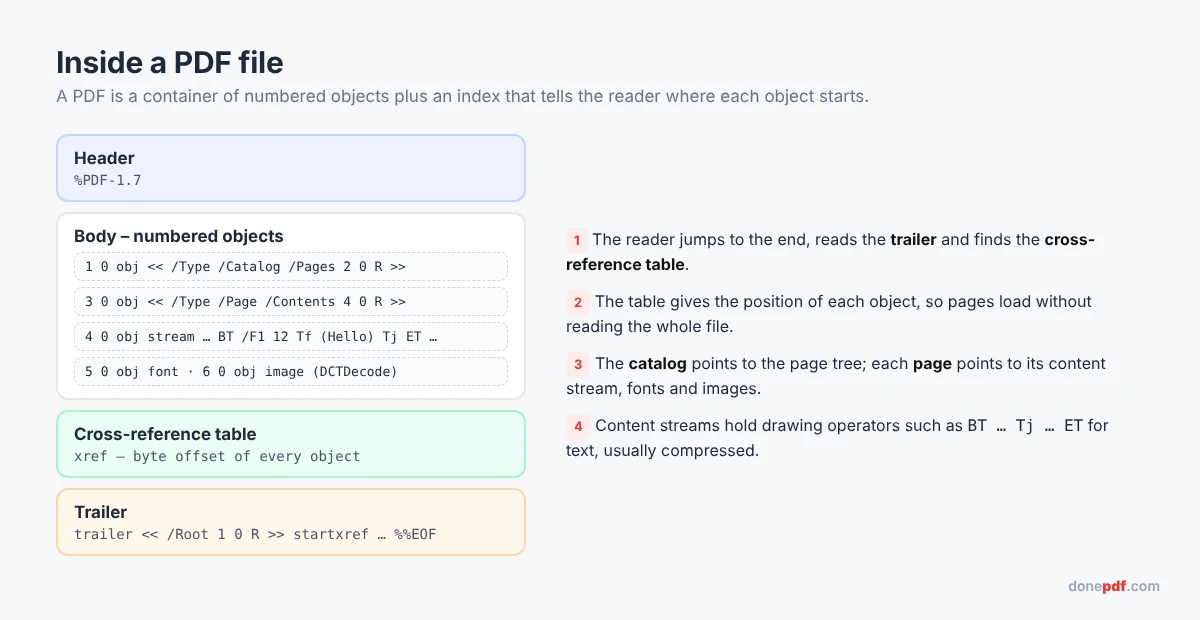
| Section | Description | Example |
|---|---|---|
| Header | The first line. It identifies the PDF version the file uses. | %PDF-1.7 |
| Body | The document objects: pages, fonts, images, annotations. Each indirect object has an object number and a generation number. | 3 0 obj << /Type /Page /Parent 2 0 R /Contents 4 0 R >> endobj |
| Cross-reference table | An index giving the byte offset of every object, so a reader can jump straight to any object without scanning the whole file. | xref 0 6 0000000000 65535 f 0000000015 00000 n ... |
| Trailer | Points to the document catalog (the root object) and, through startxref, to the byte offset of the cross-reference section. |
trailer << /Size 6 /Root 1 0 R >> startxref 1234 %%EOF |
In the examples, 2 0 R is an indirect reference: "object 2, generation 0". Since PDF 1.5 the cross-reference data can also be stored in a compressed cross-reference stream instead of the plain-text table, and many objects can be packed into object streams.
Objects Explained
Every indirect object is wrapped in N G obj ... endobj. Common objects in a document:
- Catalog - the root of the document, referenced by the trailer.
- Page tree - a tree of
/Pagesnodes that holds the pages. - Page object - points to its resources (fonts, images) and its content stream.
- Content stream - a stream of operators that draw text, lines and images.
- Font dictionary - describes a font and can point to an embedded font file.
- XObject - an "external object": an image XObject or a form XObject (reusable graphics).
- Annotation dictionary - comments, links and form-field widgets.
How PDF Renders Text - Content Streams and Operators
Text in a PDF is not stored as flowing words but as operators in a page's content stream. A minimal example:
BT /F1 12 Tf 100 700 Td (Hello World) Tj ET
- BT / ET - begin and end a text object.
- Tf - set the font (
/F1, a name defined in the page's resources) and size (12). - Td - move the text position, here to x=100, y=700 (measured in points from the bottom-left corner).
- Tj - show the string "Hello World".
Each character code is mapped to a glyph through the font's encoding. Positions and spacing are fixed in the file, which is why PDF text does not reflow.
Vector Graphics in PDF - Paths, Curves, and Shapes
Paths are built with operators such as m (move to), l (line to), c (cubic Bezier curve), re (rectangle) and h (close path), and then painted with S (stroke) or f (fill). Example:
0 0 m 100 0 l 100 100 l 0 100 l h f
This draws a filled 100 x 100 square. Because paths are geometry rather than pixels, they stay sharp at any zoom level, which is why PDF suits logos, diagrams and technical drawings.
Compression in PDF - How PDF Stays Small
Streams can be compressed with filters, named in the stream's /Filter entry:
| Filter | Typically used for | Lossless / lossy |
|---|---|---|
FlateDecode (zlib/deflate) | Content streams, fonts, general data, some images | Lossless |
LZWDecode | Older files; largely replaced by Flate | Lossless |
DCTDecode (JPEG) | Photographs | Lossy |
JPXDecode (JPEG 2000) | Photographs and high-quality images | Lossy or lossless |
JBIG2Decode | Black-and-white scans, especially text | Lossy or lossless |
CCITTFaxDecode | Black-and-white scans (fax Group 3/4) | Lossless |
RunLengthDecode | Simple images with long runs of the same value | Lossless |
Filters can be chained, and there are also ASCIIHexDecode and ASCII85Decode, which only encode binary data as text rather than shrink it. JBIG2 is very efficient for scanned text pages. If a file is larger than it needs to be, you can compress the PDF.
Font Handling - Embedded Fonts vs Subsets
To make text look identical everywhere, a PDF can embed the font program. Supported font types include:
- Type 1 - Adobe's older PostScript font format.
- TrueType - widely used on Windows and macOS.
- OpenType - embeddable directly since PDF 1.6.
- CID-keyed (composite, Type 0) fonts - for large character sets such as Chinese, Japanese and Korean.
A font subset contains only the glyphs actually used. A document that uses only the word "Hello" needs just the glyphs H, e, l and o. Subset fonts are easy to spot: their names start with six capital letters and a plus sign, such as ABCDEF+Arial.
PDF also defines 14 standard fonts (Times, Helvetica and Courier in four styles each, plus Symbol and ZapfDingbats) that readers are expected to provide, so older files often use them without embedding.
Color Spaces - RGB, CMYK, Grayscale, and ICC Profiles
Common PDF color spaces:
- DeviceRGB - red, green, blue, interpreted by the output device (not tied to sRGB or any other profile).
- DeviceCMYK - cyan, magenta, yellow, black, for print.
- DeviceGray - grayscale.
- ICCBased - colors defined by an embedded ICC profile, for color-managed workflows.
- Separation and DeviceN - spot colors such as Pantone inks.
- Indexed, Lab, CalRGB/CalGray and Pattern are also available.
Print-oriented PDF/X files must declare an output intent (an ICC profile for the target printing condition). PDF/X-1a allows only CMYK, gray and spot colors; PDF/X-3 and PDF/X-4 also allow color-managed RGB.
Transparency - How PDF Handles Alpha
Transparency was added in PDF 1.4. It is controlled through the extended graphics state (ExtGState): constant opacity (CA for strokes, ca for fills), blend modes (BM) and soft masks (SMask). Images can also carry their own soft mask, which works like an alpha channel. Viewers or print workflows that do not support transparency either draw objects as fully opaque or require the transparency to be flattened first, so check the output if your design depends on it.
Security Features - Encryption, Permissions, and Signatures
PDF encryption is applied to the strings and streams inside objects; the file structure itself (cross-reference table and trailer) stays readable. The algorithm and key length are recorded in the encryption dictionary, referenced by /Encrypt in the trailer. The standard security handler has evolved with the format:
- RC4, 40-bit - PDF 1.1 to 1.3.
- RC4, 128-bit - PDF 1.4 and 1.5.
- AES-128 - PDF 1.6 and PDF 1.7 (ISO 32000-1).
- AES-256 - first as an Adobe extension to PDF 1.7, then standardized in PDF 2.0 (ISO 32000-2) with improved password handling. PDF 2.0 deprecates RC4 and the earlier AES-256 variant.
Permissions such as "no printing" or "no copying" are stored as bit flags in a 32-bit integer (the /P entry). They are only enforced by viewers that respect them; the owner password is not a strong protection on its own. Digital signatures are stored in signature dictionaries; a /ByteRange entry lists exactly which bytes of the file were signed. To add a password, you can protect the PDF.
How PDF Viewers Render a Page - Step by Step
- The viewer reads the end of the file, finds
startxrefand loads the cross-reference data and trailer. - The trailer's
/Rootentry points to the catalog. - The catalog points to the page tree.
- The page tree leads to the requested page object.
- The page object lists its resources (fonts, images, patterns) and its content stream.
- The viewer decompresses the content stream and executes the operators in order: text is drawn with the fonts, images are decoded, paths are filled or stroked.
- The result is shown on screen or sent to the printer.
Scanned PDFs and OCR - How the Text Layer Works
A scanned PDF page is usually just an image; there is no text to select. OCR adds a text layer by:
- Analyzing the image to recognize characters and their positions.
- Writing that text onto the page in invisible text rendering mode (
3 Tr), aligned with the image. - Letting the viewer show the image while search and selection use the invisible text.
You can add a searchable text layer with OCR PDF (this tool runs on our server; files are deleted right after processing). More on the recognition step in how OCR works.
PDF Subsets - PDF/A, PDF/X, PDF/E, PDF/UA
- PDF/A (ISO 19005) - long-term archiving. Fonts must be embedded; JavaScript, encryption and external content dependencies are not allowed.
- PDF/X (ISO 15930) - print production. Requires an output intent and defined page boxes; PDF/X-1a and PDF/X-3 do not allow transparency, PDF/X-4 does.
- PDF/E (ISO 24517) - exchange of engineering documents. PDF/E-1 is based on PDF 1.6.
- PDF/UA (ISO 14289) - universal accessibility: tagged structure, alternative text and reading order for assistive technology such as screen readers.
The base format itself is ISO 32000-1:2008 (PDF 1.7) and ISO 32000-2 (PDF 2.0, first published 2017, revised 2020). To create an archival copy, you can convert to PDF/A (processed on our server and deleted afterwards).
Inspecting PDF Internals - Tools for Developers
- qpdf -
qpdf --qdf --object-streams=disable input.pdf output.pdfwrites a version with uncompressed streams and no object streams that you can read in a text editor. - pdftk -
pdftk input.pdf dump_dataprints metadata, bookmarks and page information. - Apache PDFBox - a Java library, with a PDFDebugger tool for browsing objects.
- iText RUPS - a GUI for browsing the object tree.
- A hex editor - for low-level checks of headers, offsets and damaged files.
Common PDF Problems and Their Technical Causes
"Text selects as gibberish"
Cause: the font has a custom encoding and no correct ToUnicode map, so the viewer cannot translate the character codes into Unicode. Solution: re-create the PDF from the source with proper fonts, or run OCR to get a clean text layer.
"PDF is extremely large"
Cause: uncompressed or very high-resolution images, fully embedded fonts instead of subsets, or duplicated objects left by repeated editing. Solution: compress the file or use an optimizer such as Acrobat's Optimized PDF option.
"PDF prints slowly or fails"
Cause: complex transparency, very high-resolution images or color spaces the printer handles poorly. Flattening transparency and downsampling images to around 300 DPI usually helps.
"I cannot select text even though it looks like text"
Cause: the page is a scanned image, or the text was converted to outlines (vector paths). Neither contains character codes, so OCR is the way to make it searchable. For other everyday issues, see common PDF problems and solutions.
Conclusion - PDF Under the Hood
A PDF is an object-based container: a header, numbered objects, a cross-reference index and a trailer, with content streams that describe each page as drawing operators. That design gives fast random access, compact files through compression filters, and consistent output across devices. Knowing the pieces makes it much easier to understand why a file is large, why its text will not copy, or why a printer rejects it.
Frequently Asked Questions
What is inside a PDF file?
A header with the PDF version, a body of numbered objects (catalog, pages, fonts, images, annotations), a cross-reference table giving each object's byte offset, and a trailer that points to the catalog. Page content is stored as content streams of drawing operators.
Why does PDF text sometimes look like garbage when copied?
The font uses a custom encoding and the file lacks a correct ToUnicode map, so the viewer cannot turn the character codes into real characters. Re-creating the PDF from the source fixes it; otherwise OCR can add a clean text layer.
What is the difference between a content stream and an object?
An object is any building block of the file, such as a page, font or image. A content stream is a stream object holding a sequence of operators (for example Tj to show text or re to draw a rectangle) that tells the viewer what to draw on a page and where.
How does PDF encryption work?
The strings and streams inside objects are encrypted; the cross-reference table and trailer are not. Current files use AES-256 (standard in PDF 2.0); older ones use AES-128 or RC4. The key is derived from the password, and permissions are stored as flags in the encryption dictionary. You can add a password with Protect PDF.
What is PDF/X and how is it different from regular PDF?
PDF/X (ISO 15930) is a subset for print production. It requires an output intent describing the printing condition. PDF/X-1a allows only CMYK, gray and spot colors and no transparency; PDF/X-4 allows color-managed RGB and live transparency. Regular PDF has none of these restrictions.
Can a PDF contain malicious code?
Yes. PDFs can contain JavaScript and embedded files, and malicious PDFs may try to exploit bugs in a reader. Open PDFs from trusted sources, keep your reader updated, and disable JavaScript in the reader if you do not need it.