PDF and JPG are two of the most common file formats, but they do different jobs. JPG (also written JPEG) is an image format built for photographs, trading a little quality for a much smaller file. PDF is a document format: it keeps text, vector graphics, images and page layout together, across as many pages as you need. Picking the wrong one leads to blurry text, oversized files or missing features. This article compares the two on compression, pages, text, transparency, scaling, file size and security, then covers when PNG is the better image choice and how to convert between formats.
Quick Overview: PDF vs JPG at a Glance
| Feature | JPG / JPEG | |
|---|---|---|
| Name | Portable Document Format | Named after the Joint Photographic Experts Group |
| Primary use | Documents, forms, contracts, printing, archiving | Photographs, web images, thumbnails |
| Compression | Per object: lossless for text and vectors; images can be lossless or lossy | Lossy (DCT-based) |
| Transparency | Yes | No alpha channel |
| Multiple pages | Yes | No, one image per file |
| Selectable text | Yes, unless the page is a scan without OCR | No, text is pixels |
| Vector graphics | Yes | No, raster only |
| Passwords and signatures | Yes (encryption, permissions, digital signatures) | No |
| Text in print | Sharp at any size | Depends on resolution; edges can blur |
What is a PDF?
PDF was created by Adobe and released with Acrobat in 1993; it became an ISO standard in 2008 as ISO 32000-1. A PDF describes pages independently of the software, hardware and operating system used to view them. One file can hold vector graphics, raster images and real text with embedded fonts, across many pages, plus forms, annotations and digital signatures. Photos inside a PDF are often stored as JPEG data directly (the DCTDecode filter), so a PDF can carry a JPG without re-encoding it. For more background, see what a PDF file is.
What is JPG (JPEG)?
JPEG is named after the committee that wrote it, the Joint Photographic Experts Group. The standard was approved as ITU-T Recommendation T.81 in 1992 and published as ISO/IEC 10918-1 in 1994. It uses lossy compression based on the discrete cosine transform (DCT), discarding detail the eye is less likely to notice. Baseline JPEG stores 8 bits per color channel, has no transparency, and supports images up to 65,535 × 65,535 pixels. It works very well for photos, but sharp edges such as text and line art tend to show compression artifacts, and quality drops a little each time a JPG is edited and saved again.
Key Differences in Depth
1. Compression
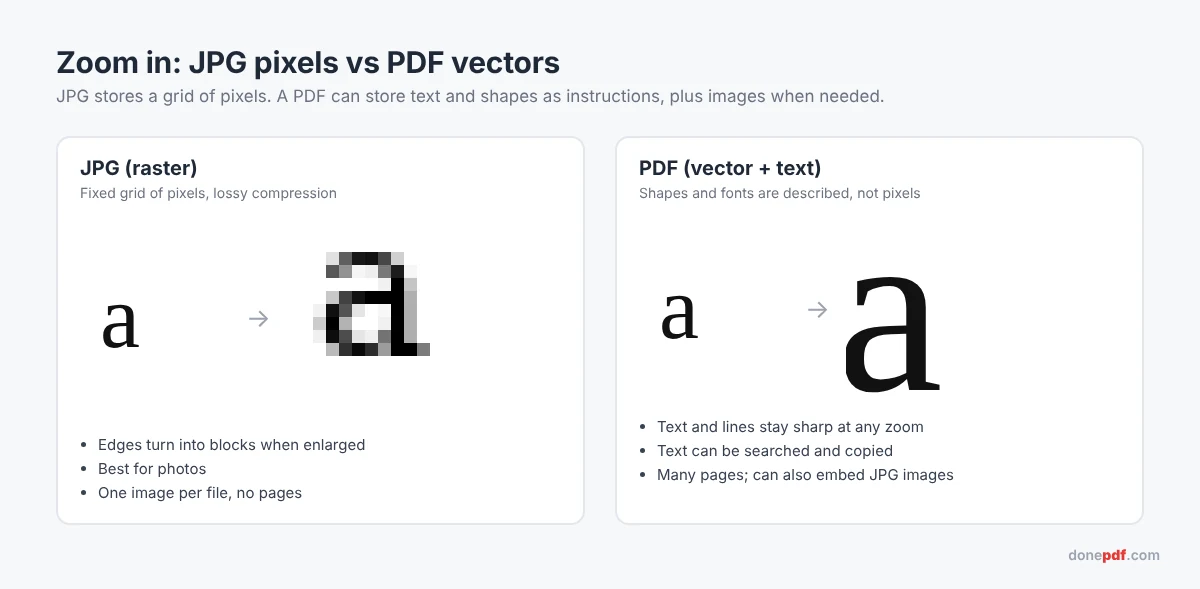
JPG is lossy. Each time a JPG is re-encoded, some detail is lost. On photos, moderate compression is often hard to see; on text, logos and diagrams it causes blur and ringing around edges. A PDF can mix lossy and lossless content. Text and vector graphics stay exact at any zoom, while embedded photos can be stored as JPEG to save space.
2. Multiple Pages vs Single Image
A single PDF can hold a whole book. A JPG holds one image, so a multi-page document becomes a set of separate files. For anything with more than one page, PDF is the practical choice; for a single photo, JPG is fine.
3. Text Handling
A PDF created from a word processor contains real, selectable and searchable text, and a scanned PDF can be made searchable with OCR. A JPG has no text layer: any text in it is just pixels, so you cannot search, copy or edit it without running OCR first.
4. Transparency
JPG has no alpha channel. Areas that were transparent in the original are filled with a solid color, usually white, which makes JPG a poor fit for logos and overlays. PDF supports transparency, so a logo with a transparent background can sit cleanly on a page. For a standalone image that needs transparency, use PNG (see below).
5. Vector vs Raster
JPG stores a grid of pixels; enlarge it far enough and the pixels show. PDF can store lines, shapes and text as vector paths that scale without losing sharpness, so a vector logo in a PDF prints cleanly at any size, while a JPG logo becomes pixelated when enlarged.
6. File Size
For a single photo, a JPG is usually the smallest practical option. Placing that JPG in a PDF typically adds only a small amount of overhead when the image data is embedded as-is, but more if the tool re-encodes it. For text documents the situation reverses: a page of real text in a PDF is far smaller than an image of the same page, and the gap grows with every page.
7. Security
PDF supports password encryption (AES-256 in current versions), permission settings such as restricting printing or copying, and digital signatures. JPG has no security features of its own; anyone who has the file can open, copy and change it. To restrict access to scanned pages or photos, put them in a PDF and add a password with Protect PDF.
When PNG Is the Better Image Choice
PNG is a lossless image format: it compresses without discarding any detail, so the image looks the same no matter how many times it is saved. It also supports full alpha transparency. That makes PNG better than JPG for screenshots, logos, icons, charts, diagrams and anything with text or sharp edges. The trade-off is size: for photographs, a PNG is usually several times larger than a JPG of acceptable quality. A simple rule: photos go to JPG, graphics and screenshots go to PNG, and multi-page documents go to PDF. The format is defined in the W3C PNG specification.
When to Use PDF
- Multi-page documents such as reports, manuals, e-books and contracts.
- Documents where text matters, such as resumes, forms and articles.
- Print-ready materials; print shops often ask for PDF/X (ISO 15930).
- Legal and financial documents that need passwords or signatures.
- Long-term archiving with PDF/A (ISO 19005).
- Logos and diagrams that must stay sharp at any size.
- Layouts that combine text and images and must look the same everywhere.
When to Use JPG
- Photographs for the web, email or social media, where small files load faster.
- Product photos on online shops.
- Preview thumbnails of PDF pages.
- Images shown on screens rather than printed large.
- When file size matters more than perfect quality and no transparency is needed.
Converting Between PDF and JPG
PDF to JPG
Turning PDF pages into images is useful for thumbnails, website previews or apps that only accept images. You can convert PDF pages to images; each page becomes its own image file. Keep in mind that the text in the result is no longer selectable.
JPG to PDF
Combining several photos or phone scans into one PDF makes them easier to send, print and keep in order. You can combine images into a PDF and then add a password if the pages are sensitive.
Real-World Scenarios
Sending 20 scanned receipts
PDF. One file is easier to email, upload and review than 20 separate images, and the recipient can scroll through it in order.
Posting a photo on social media
JPG. Social platforms are built around image uploads, and most do not accept PDFs as posts.
Sending a signed contract
PDF. It supports digital signatures and keeps the text selectable; a JPG offers neither.
Printing a brochure
PDF, usually PDF/X. Commercial printing needs exact page size, bleed, CMYK color and embedded fonts, which a PDF can carry and a JPG cannot.
Sharing one page from a long document
Either. A JPG is fine for a quick look on a phone. If the recipient needs to print it or zoom into the text, send a one-page PDF instead: extract the page first, and convert it to an image only if needed.
Best Practices for Each Format
For JPG
- For web photos, a medium-high quality setting usually looks the same as the maximum at a much smaller size; compare a few settings on your own images.
- Avoid editing and re-saving the same JPG repeatedly. Keep a lossless original (RAW, TIFF or PNG) and export a fresh JPG when needed.
- Do not use JPG for text, logos or line art; use PNG or PDF.
For PDF
- When exporting from a word processor, use its built-in Save as / Export to PDF option rather than a virtual printer; it usually keeps links, bookmarks and accessibility tags.
- For PDFs full of photos that are too large to email, compress the file before sending.
- For scanned documents, run OCR so the text can be searched and copied.
Common Misconceptions
- "JPG is always lower quality than PDF." Not for photos. A photo stored inside a PDF is often the same JPEG data. For text, PDF is clearly better.
- "Converting a JPG to PDF makes its text editable." No. The text is still pixels inside the PDF until you run OCR.
- "PDF files are always large." A text-only PDF can be very small, often smaller than one image of the same page.
- "JPG supports transparency." It does not. Use PNG for transparent backgrounds.
- "A PDF converted to JPG keeps selectable text." It does not; the result is an image.
Conclusion
PDF and JPG are built for different content. Use JPG for photographs where small size matters and slight quality loss is acceptable. Use PNG for screenshots, graphics and images that need transparency. Use PDF for documents that contain text, span several pages, include vector graphics or need passwords and signatures. When you need to move between them, convert pages to images or bundle images into a PDF, and pick the format based on what the recipient will do with the file.
Frequently Asked Questions
What is the main difference between PDF and JPG?
PDF is a document format: it can hold multiple pages, selectable text, vector graphics and security features such as passwords and signatures. JPG is a single-image format with lossy compression, no text layer and no security. Use PDF for contracts, reports and forms, and JPG for photos and web images.
Can I convert a PDF to JPG for free?
Yes. You can convert PDF pages to images on DonePDF for free, with no sign-up and no watermark. Each page becomes a separate image. The text in the images will not be selectable.
Can I combine multiple JPG photos into one PDF?
Yes. Use Images to PDF to put several photos or scans into a single PDF, one image per page. It is free, with no sign-up and no watermark.
Should I use PNG or JPG for a screenshot?
PNG. Screenshots contain text and sharp edges, which JPG compression blurs. PNG is lossless and keeps them crisp; JPG is the better choice for photographs.
Can I add a password to a JPG file?
No, JPG has no built-in password protection. To restrict access to images, combine them into a PDF and then add a password with Protect PDF.
Is JPG good for printing?
For photos, yes, if the image has enough resolution for the print size; around 300 pixels per inch is a common target. For documents with text, logos or fine lines, PDF prints much more sharply.